
Type on your computer with the keyboard you already know
Type or swipe on your phone the way you always do — autocorrect and all — and the words appear on your computer. With the shortcut keys your phone doesn’t have.
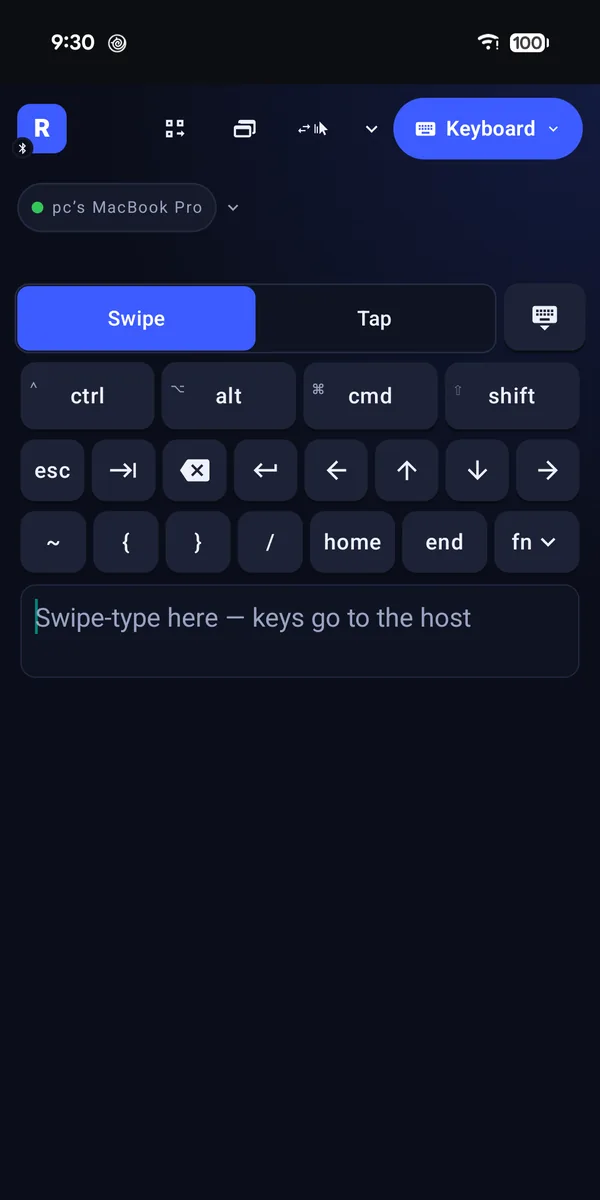
No new keyboard to learn. Remotype uses the one already on your phone, so swipe typing, autocorrect and your languages all just work — and it adds the keys a phone keyboard is missing.
What you can do
Your own phone keyboard
Swipe or tap exactly as you normally do.
Shortcut keys
Ctrl, Alt, Cmd and Shift for copy, paste, undo and every shortcut you already know.
The keys phones leave out
Escape, Tab, arrows, function keys and more.
Switch apps in a tap
Jump between open apps and windows without a keyboard shortcut.
More than English
Accents and other keyboard layouts come out right when connected over Wi-Fi.
How to start
- Connect your phone — Bluetooth on Android, or Wi-Fi with Remotype Host.
- Open the keyboard and type.
- Want your own shortcut buttons? Make them in Macros.
Worth knowing
- Free forever on iPhone and Android.
- Over Bluetooth, your computer uses its own keyboard language setting — just like any Bluetooth keyboard.
Good for
- A long search on the TV computer without a keyboard in the living room.
- Replying to a message on the desktop while you stretch your legs.
- Typing a password on a machine whose keyboard has gone missing.
- Sending Ctrl-Alt-Delete to a PC across the room.
Questions
Can I swipe-type on my computer with Remotype?
Yes. Remotype uses your phone’s own keyboard, so swipe typing and autocorrect work as usual, and the words appear on your computer. It’s free forever on iPhone and Android.
Goes well with
Try it
Keyboard and trackpad are free forever. Everything else is free for 14 days, then 30 minutes a month — or $4.99 a month, $39.99 a year, or $99.99 once.