Only for iPhone, or Android over Wi-Fi. An Android phone over Bluetooth needs nothing on the computer — see Locked-down PC.
Download for Mac, Windows & Linux
From Custavia · Remote input
Remotype Your phone is the keyboard now
Type and point from anywhere in the room.
Pick your situation
Remotype turns an Android phone or an iPhone into a wireless keyboard, trackpad and remote for your computer or TV. Neither macOS, Windows nor Android ships an answer for a phone in your hand and a computer across the room. Swipe typing, real shortcuts, a multi-touch trackpad. Keystrokes travel over your own Wi-Fi or Bluetooth as they happen. No account, no tracking.
The short answers
Does it work on iPhone? Yes — over Wi-Fi with the free host. iPhone has no Bluetooth keyboard mode (an Apple limit).
Anything to install on the computer? Android over Bluetooth: nothing at all. iPhone, or anything that shows the computer: the free host.
Which computers? Mac, Windows and Linux — Linux is input only, computer audio is Mac only. Screen mirror, clipboard and the presenter overlay are Mac and Windows; casting is full on Mac, partial on Windows. What each host does.
What does it cost? Keyboard and trackpad free forever. Premium $4.99/mo, $39.99/yr, or $99.99 once — the Eternal License, next major version 30% off.Full pricing — jump to the pricing section.
Pick your situation. The tag under each one says which phone, whether the computer needs Remotype Host, and whether it is free or Premium.
Replace the TV remote
Android TV and Google TV: D-pad, volume, power and a real keyboard for search, over Wi-Fi. A dumb TV, or an iPad, that accepts a Bluetooth keyboard: pair the Android phone over Bluetooth; it just sees a keyboard.
Android TV: iPhone & Android · no HostDumb TV or iPad: Android · BluetoothKeyboard & trackpad freeD-pad & TV remote: Premium
Next slide, previous slide, blank screen, a timer in your hand. Spotlight, laser, ink and shapes are drawn by Remotype Host on the computer's own screen, so they show in Zoom, Meet and Teams screen shares and in recordings — when you share the whole screen, not a single window or a browser tab.
Pair the Android phone as an ordinary Bluetooth keyboard and mouse. No software on the computer; it sees a standard Bluetooth keyboard. An iPhone cannot do this: it needs Remotype Host on the computer.
Android · BluetoothNeeds Bluetooth switched on at the PCFree forever
Keyboard and trackpad for the Mac, Windows PC or Linux box under the TV. Play, pause and volume keys, and a live mirror of the computer's screen on your phone, are Premium; mirror needs the Host on Mac or Windows.
Android · Bluetooth or HostiPhone · needs HostKeyboard & trackpad freeMedia keys + mirror: PremiumPlay, pause, volume keys
A computer with no keyboard, or several on one desk
Give any Mac, Windows PC or Linux desktop (X11 or Wayland) a keyboard and trackpad — a mini-PC, NUC or home server with no keyboard attached, or several machines sharing one desk. First connect shows a pairing code on the computer’s screen, so a headless box needs a display, or a remote session, once. Switch computers inside the app, or slide the pointer off one screen onto the next on Mac and Windows hosts.
Headless box, no keyboardPairing code needs a screen onceiPhone & Android · needs Host (Mac, Windows, Linux)Keyboard & trackpad freeSwitching: PremiumEdge flow: Mac & Windows only · Premium
Connect by IP over your own Tailscale or VPN link and the computer behaves as if it were in the room. The Host listens on a fixed port, and nothing is relayed through us.
Three things you can check yourself. The Host source is on GitHub under Apache-2.0. The Host makes zero internet connections: no updater, no telemetry. Pairing uses a code shown on the computer's own screen, and the same AES-256-GCM code seals every session on Mac, Windows and Linux.
What you need
Android over Bluetooth
Nothing on the computer. It sees an ordinary Bluetooth keyboard and mouse.
Android over Wi-Fi, and every iPhone
The free Remotype Host on the computer: a menu-bar or tray app for Mac, Windows and Linux (Linux is input only; computer audio is Mac only), open source under Apache-2.0. An iPhone cannot act as a Bluetooth keyboard; that is an Apple platform limit.
Android TV or Google TV
Nothing on the TV. The phone talks to it directly over Wi-Fi, with a code the TV shows.
Premium $4.99/mo · $39.99/yr · $99.99 once. Keyboard and trackpad free forever. Premium is free for 14 days, then 30 minutes a month. The $99.99 Eternal License is this major version for good: compatibility fixes for new OS releases stay free. Prices in USD. Full pricing — jump to the pricing section
iPhone: iOS 16 or later. Android: Android 9 or later.
iPhone vs Android
iPhone connects over Wi-Fi. Android connects over Bluetooth or Wi-Fi.
The same deck on both phones, and every free mode is identical. The big difference is how the phone reaches the computer — and on Android, whether the computer needs anything installed at all. A few extras are iPhone-only: walk-away lock, open-an-app, the right-edge scroll lane and the in-app accent picker.
Free forever: keyboard, trackpad, Both mode, and finding and connecting to a computer on your network. No ads, no account, no tracking. Premium: free for 14 days, then 30 minutes a month — or $4.99 a month, $39.99 a year, or $99.99 once (the Eternal License: the current major version, yours to keep). Prices in USD; stores show local equivalents. Full pricing — jump to the pricing section.
iPhone
Over Wi-Fi with the free Remotype Host.
Apple does not let an iPhone act as a Bluetooth keyboard. So an iPhone reaches a computer over your own Wi-Fi, through Remotype Host — a free, open-source app for Mac, Windows and Linux. The phone finds the computer on the network by itself (Bonjour); Connect-by-IP covers Tailscale and VPN setups.
Every computer feature on iPhone runs over that link. First connect shows a pairing code on the computer's screen, and every session after it is sealed with AES-256-GCM.
Wi-Fi + Remotype Host · no Bluetooth keyboard mode
Android
Bluetooth with nothing installed, or Wi-Fi with the Host for everything.
Over Bluetooth the phone pairs as an ordinary keyboard, mouse and media remote. Nothing is installed on the other end — any computer, TV or iPad that accepts a Bluetooth keyboard will take it. If your IT policy disables Bluetooth on the PC, the Bluetooth path is not available and the Wi-Fi path needs the Host installed.
Over Wi-Fi the same deck drives Remotype Host instead, and adds everything that needs data back from the computer: screen mirror, computer audio (Mac host only), clipboard pull, vitals, the presenter overlay, casting and edge flow (Mac and Windows hosts; Linux is input only).
Bluetooth: nothing to install · Wi-Fi + Host: everything
The Bluetooth link is one-way. It carries keystrokes, pointer moves, clicks, scrolling and media keys out to the computer, and nothing comes back. Anything that shows, hears or reads the computer needs Remotype Host over Wi-Fi. The Host is free and open source under Apache-2.0: github.com/Custavia/remotype-host.
Every feature, tagged by phone, host and plan
What the tags mean
iPhoneAndroidThe phones a feature runs on.
Works over BluetoothOn Android, with nothing installed on the computer. It also works over Wi-Fi with the Host.
Requires HostNeeds the free Remotype Host running on the computer, on either phone.
MacWindowsLinuxThe hosts that support the feature. Linux is input-first by design: keyboard, trackpad, media keys and the full pairing and encryption layer, on X11 and Wayland. Screen capture, audio, overlays, clipboard and casting are out of scope there.
FreePremiumFree forever, or part of Premium — 14 days free, then 30 minutes a month, or $4.99 a month, $39.99 a year, $99.99 once.
Every Remotype feature, tagged by phone, how Android connects, which hosts support it, and whether it is Free or Premium.
Feature
Phone
How Android connects
Works with
Plan
Getting connected
Find and connect to a computer over Wi-FiBonjour discovery on your own network. Auto-connect to the last computer is a free setting.
iPhoneAndroid
Requires Host
MacWindowsLinux
Free
Pair as a Bluetooth keyboard and mouse, with nothing installed on the computerStandard Bluetooth pairing. Works with any computer, TV or iPad that accepts a Bluetooth keyboard. Android only.
Android
Works over Bluetooth
No host needed
Free
Pair with a code shown on the computer, then an AES-256-GCM sealed sessionThe Wi-Fi path. Over Bluetooth the phone and computer use the operating system's own pairing.
iPhoneAndroid
Requires Host
MacWindowsLinux
Free
Connect by IP, for a computer on another network (Tailscale, VPN)The Host listens on fixed port 50808.
iPhoneAndroid
Requires Host
MacWindowsLinux
Premium
Typing and pointing — free forever
Keyboard: swipe and tap typing, modifiers, Fn rowSwipe mode uses the phone's own keyboard.
iPhoneAndroid
Works over Bluetooth
MacWindowsLinux
Free
Trackpad: multi-touch move, click, scroll, pinch and zoomiPhone adds a right-edge scroll lane. Over Bluetooth, pinch and zoom depend on how the computer reads the wheel and modifier combination.
iPhoneAndroid
Works over Bluetooth
MacWindowsLinux
Free
Both mode: keyboard and trackpad on one screen
iPhoneAndroid
Works over Bluetooth
MacWindowsLinux
Free
Mode rail, layout presets, show and hide the keyboard
iPhoneAndroid
Works over Bluetooth
On the phone
Free
App and window switcher buttonCmd+Tab / Alt+Tab and Cmd+` / Ctrl+Tab from the header. A plain key sequence.
iPhoneAndroid
Works over Bluetooth
MacWindowsLinux
Free
Non-US keyboard layouts, accented and non-Latin textOver Wi-Fi the Host types real text: Unicode on Mac, xkbcommon with dead keys on Linux. Over Bluetooth the phone sends US key codes and the computer applies its own layout, so non-ASCII characters need the Host.
iPhoneAndroid
Requires Host
MacWindowsLinux
Free
More ways to drive the computer
Numeric keypadTrue keypad key codes and an arrow row.
iPhoneAndroid
Works over Bluetooth
MacWindowsLinux
Premium
Media keys: play and pause, next and previous, volume, muteConsumer-control keys over Bluetooth; media messages over Wi-Fi.
iPhoneAndroid
Works over Bluetooth
MacWindowsLinux
Premium
Screen brightness keysOver Wi-Fi only the Windows host honors them. Over Bluetooth the computer decides whether to honor the brightness key.
iPhoneAndroid
Works over Bluetooth
Windows
Premium
Presentation remote: next and previous slide, blank, plus a timer on the phoneSlide navigation is keystrokes, so it travels over Bluetooth. The timer runs on the phone.
iPhoneAndroid
Works over Bluetooth
MacWindowsLinux
Premium
Air mouse: gyro pointer with left and right clickNeeds a gyroscope in the phone.
iPhoneAndroid
Works over Bluetooth
MacWindowsLinux
Premium
Macros: combos, snippets, key sequences, installable sets, import and exportKey-sequence macros travel over Bluetooth. The open-app macro type is iPhone only.
iPhoneAndroid
Works over Bluetooth
MacWindowsLinux
Premium
Secrets: passwords typed straight to the computer, behind the phone's biometricsTyped as keystrokes, never through the clipboard. On iPhone they are Keychain-backed and never enter iCloud or device backups.
iPhoneAndroid
Works over Bluetooth
MacWindowsLinux
Premium
Dictation to keystrokesOn-device speech recognition. Nothing leaves the phone but the typed text.
iPhoneAndroid
Works over Bluetooth
MacWindowsLinux
Premium
Clipboard push: phone to computerOver Wi-Fi the Host sets the computer's clipboard (Mac and Windows hosts). Over Bluetooth the phone types the text out, character by character.
iPhoneAndroid
Works over Bluetooth
MacWindows
Premium
Quick switch between computers, without disconnectingAndroid switches across Bluetooth and Wi-Fi computers; iPhone switches across Wi-Fi hosts.
iPhoneAndroid
Works over Bluetooth
MacWindowsLinux
Premium
What the computer sends back — Remotype Host only
Clipboard pull: computer to phoneNeeds data back from the computer, so Bluetooth cannot carry it. Mac and Windows hosts.
iPhoneAndroid
Requires Host
MacWindows
Premium
Clipboard file transfer
iPhoneAndroid
Requires Host
MacWindows
Premium
Follow-me clipboard when you switch computersCaptures the clipboard of the computer you leave.
iPhoneAndroid
Requires Host
MacWindows
Premium
Edge flow: slide the pointer off one screen onto the next computerEach computer runs the Host.
iPhoneAndroid
Requires Host
MacWindows
Premium
Screen mirror (TV mode): inline panel, fullscreen, zoom, follow-cursor, computer volumeThe computer's screen on your phone. iPhone adds an immersive mode. Not with the Linux host.
iPhoneAndroid
Requires Host
MacWindows
Premium
Computer audio streamed to the phoneMac host only. Not the Windows host, not the Linux host.
iPhoneAndroid
Requires Host
Mac
Premium
Spotlight presenter: spotlight, laser, ink, shapes, blank screen, countdown overlayDrawn by the Host on the computer's own screen, so it shows up in whole-screen shares and recordings — not in a single-window or browser-tab share.
iPhoneAndroid
Requires Host
MacWindows
Premium
Computer vitals tile: CPU, memory, volume, now playing
iPhoneAndroid
Requires Host
MacWindows
Premium
Cast the computer's screen to a TV or ChromecastFull on the Mac host, which adds a WebRTC path plus quality and volume control. Partial on Windows, which also offers Miracast. Not on Linux.
iPhoneAndroid
Requires Host
MacWindows
Premium
Open an app by nameOn iPhone today, as a macro type. Not on Android.
iPhone
Requires Host
MacWindows
Premium
Walk-away lock: the computer locks when the phone leaves rangeiPhone only on the phone side. Full on the Mac host; on Windows it is partial (the host accepts the arm, but does not disarm). Not on Linux.
iPhone
Requires Host
MacWindows
Premium
TVs and iPads
Android TV and Google TV remote: D-pad, OK, number pad, back, home, power, volume, text entryThe phone talks to the TV directly over Wi-Fi, using the Android TV Remote Protocol v2 and a six-digit code shown on the TV. No Remotype Host and no Bluetooth involved. This is the only TV path on iPhone.
iPhoneAndroid
Straight to the TV
No host needed
Premium
TV or iPad remote over Bluetooth: D-pad, OK, back, media keysThe TV or iPad just sees a Bluetooth keyboard, so there is nothing to install on it. Android only. Plain keyboard and trackpad on the same devices stay free.
Android
Works over Bluetooth
No host needed
Premium
On the phone itself
Home-screen widget, with deep links into Trackpad, Keyboard and SpotlightOne tap connects to your recent computer. The Spotlight shortcut opens the paywall when Premium is not active.
iPhoneAndroid
On the phone
On the phone
Free
One app for iPhone; runs on iPad in iPhone compatibility modeNot a universal binary in 1.1 — the layout is a phone column, so iPad is not yet a first-class target.
iPhone
On the phone
On the phone
Free
AppearanceiPhone has an in-app accent and appearance picker. Android follows the system light and dark setting, with Material You.
iPhoneAndroid
On the phone
On the phone
Free
Trial and Plan screen: days left, Premium minutes left, Restore Purchases
iPhoneAndroid
On the phone
On the phone
Free
How this list was checked. Every row was read off the shipped host code (version 1.1.1) and the 1.1.0 phone apps on 21 September 2026 — the message handlers each host actually implements, not the marketing copy. The host code is public: github.com/Custavia/remotype-host. Host downloads and system requirements are in the host section; step-by-step setup is in the product help.
Free companion app · Open source
Remotype Host — for Mac, Windows and Linux.
Remotype is two halves: the app on your phone, and a small free companion on the computer it drives. On iPhone, and for anything that shows or hears the computer, the phone finds the Host on your Wi-Fi and talks to it directly — so without the companion there is nothing for the phone to reach, and the computer list stays empty. On Android, keyboard and trackpad also work over Bluetooth with nothing installed at all. Takes about a minute.
✓Required on iPhone. Apple does not let an iPhone act as a Bluetooth keyboard, so Wi-Fi to the Host is the only way to drive a computer.
✓Optional on Android for plain typing. Over Bluetooth an Android phone types and points with nothing installed on the computer. The Host is what adds accented and non-Latin text on any host, plus screen mirror, clipboard, the presenter overlay and edge flow between computers (Mac and Windows hosts) and computer audio (Mac only).
✓Pairs with a code shown on the computer. Every message after that is sealed with AES-256-GCM, and the crypto code is identical on macOS, Windows and Linux.
✓Zero internet connections. No updater, no telemetry, no account, on any host. It has no window: it sits in the Mac menu bar, or the system tray on Windows and Linux, and can run at login. Its own Uninstall command takes its identity, paired phones, preferences and logs with it (on Linux, removing the package leaves your pairing folder for you to delete).
macOS 1.1.1 · Windows 1.1.1 · Linux 1.1.1 · macOS 13+, Intel & Apple silicon (signed & notarized by Apple) · Windows 10+, x64 & ARM64 · Linux: Ubuntu/Debian .deb for x64 (ARM64), or a tarball for any distro (x64, ARM64) · Checksums. How to set it up →
Before you download: only the macOS build is signed and notarized. The Windows and Linux builds are unsigned, so Windows SmartScreen warns. Check your download against the SHA-256 checksums, or build it from the source.
Linux in one line: keyboard, trackpad and media keys, plus the full trust layer, on X11 and Wayland — no screen mirror, audio or clipboard. That is scope, not backlog: Wayland blocks most of it.
A computer with no keyboard: a mini-PC, NUC or home server runs the Host like any other machine, and the phone becomes its keyboard and trackpad. Pairing is the one catch — the Host puts a code on the computer’s own screen and the phone has to enter it, so a headless box needs a display, or a remote-desktop session, once. After that it stays paired, and every session is sealed with AES-256-GCM.
Mac and Windows do nearly everything. Linux is input only.
Mac: all but screen-brightness keys
Windows: no computer audio, casting partial
Linux: input only
Computer audio is macOS-host only. Screen mirror, presenter overlay, clipboard and edge flow need a macOS or Windows host, never Linux. Screen-brightness keys are Windows-only; casting is full on macOS and partial on Windows; only the macOS installer is signed. Everything else under Input and Trust works on all three.
Remotype Host 1.1.1 capabilities on macOS, Windows and Linux.
Host feature
MacmacOS 13+
WindowsWindows 10+
LinuxX11 & Wayland
Input
Keyboard, text, modifiersLinux injects through uinput, so it works under X11 and Wayland
Supported
Supported
Supported
Trackpad: move, buttons, click, scroll
Supported
Supported
Supported
Pinch / zoom gesture
Supported
Supported
Supported
Media keys: play, track, volume
Supported
Supported
Supported
Screen brightness keys — Windows only
–Not supported
Supported
–Not supported
Non-US keyboard layoutsmacOS types Unicode directly; Linux translates via xkbcommon, dead keys included
Supported
Supported
Supported
Screen, sound and TV
Screen mirror to the phone (TV mode)
Supported
Supported
–Not supported
Follow-cursor, pan, zoom, point
Supported
Supported
–Not supported
Computer audio to the phone — macOS host onlyNot Windows, not Linux
Supported
–Not supported
–Not supported
Cast the screen to a TV / ChromecastmacOS adds a WebRTC path with quality and volume control; Windows also offers Miracast
Supported
Partial
–Not supported
Presenter, clipboard and desk
Spotlight overlay, ink, shapes, blankDrawn by the Host on the computer's screen, so it appears in whole-screen shares and recordings — not in a single-window or tab share
Supported
Supported
–Not supported
Countdown timer overlay
Supported
Supported
–Not supported
Clipboard sync (text)
Supported
Supported
–Not supported
Clipboard file transfer
Supported
Supported
–Not supported
Open an app by name
Supported
Supported
–Not supported
Computer vitals: CPU, memory, volume
Supported
Supported
–Not supported
Several computers, several phones
Edge flow between computersSlide the pointer off one screen onto the next computer
Supported
Supported
–Not supported
Multiple paired phones at oncemacOS is single-connection with take-over; Windows and Linux accept per connection
Partial
Supported
Supported
Walk-away proximity lockWindows arms but does not disarm; on the phone side this one is iPhone only
Supported
Partial
–Not supported
Trust and install
Pairing with a code shown on the computerThe RT1 pairing ceremony, the same on all three
Supported
Supported
Supported
AES-256-GCM sealed sessionsIdentical crypto code on all three
Supported
Supported
Supported
Zero internet connectionsNo updater, no telemetry, on any host
Supported
Supported
Supported
Signed and notarized installer — macOS onlyWindows and Linux builds are unsigned; Windows SmartScreen warns
Supported
–Not supported
–Not supported
Menu-bar / tray app, no separate windowSame menu shape on all three
Supported
Supported
Supported
Runs at loginLinux via XDG autostart
Supported
Supported
Supported
Open source, Apache-2.0github.com/Custavia/remotype-host
Supported
Supported
Supported
Read from the shipped 1.1.1 host sources and the 1.1.0 (build 101) phone apps on 2026-09-21 — the message handlers each host implements, not marketing copy. The Host itself is free on every system; in the phone app, keyboard and trackpad stay free and the rest is Premium. See the plans.
Typing on a TV
TV and iPad.
Two different paths, and which one you get depends on the phone in your hand. Neither one installs anything on the TV.
Path 1 · Bluetooth
Any TV or iPad, as a keyboard and mouse.
An Android phone pairs through the TV’s own Bluetooth accessory settings, exactly as a keyboard would. The TV or the iPad simply sees a Bluetooth keyboard and mouse — including on the screens that never offer a keyboard of their own.
Android · BluetoothNothing installed on the TVKeyboard & trackpad freeD-pad & media remote: Premium
Path 2 · Wi-Fi
Android TV and Google TV, straight over Wi-Fi.
The phone talks to the TV directly, using the Android TV Remote Protocol and a six-digit code the TV puts on screen. D-pad, OK, number pad, back, home, power, volume and real text entry. No Remotype Host, no Bluetooth, nothing on the TV — and this is the one TV path that works from an iPhone. Android TV and Google TV only: a Fire TV, Roku, Samsung or LG set is not on this path, and goes through the Bluetooth path from an Android phone instead.
iPhone & Android · Wi-FiNo Host neededPremium
The moments that actually strand people
No keyboard appears at all. First-run sign-in, a PIN screen after a password change, re-auth on a smart TV — every button on the remote pressed, and nothing comes up.
“Use your phone” — but you can’t. Some screens replace the keyboard with a banner telling you to type on your phone instead. If the TV isn’t on your Wi-Fi yet, that handshake has nothing to hold on to.
The remote is the broken thing. A Wi-Fi remote app pairs by showing a code on the TV for you to read and type in, which assumes you can already drive the TV. Path 1 doesn’t: it pairs the way a keyboard pairs.
Honest about the catch: for the Bluetooth path you do need to reach the TV’s Bluetooth pairing screen once, and it is Android only — Apple does not permit an iPhone to act as a Bluetooth keyboard. On iPhone, the Android TV remote over Wi-Fi is the TV path, and Remotype otherwise works with Mac, Windows and Linux computers through the free Remotype Host.
What it does
A precision tool, not a remote-app toy.
Machined keycaps with real travel, built to be used while your eyes are on the other screen. Every tile says which phone it needs, whether the computer needs Remotype Host, and whether it is free or Premium. See every feature, one page each.
Swipe typing, for your computer
Glide-type with the keyboard you already use — Gboard, QuickPath, any IME — and the words land on the computer, at whatever speed your own swipe keyboard already gives you.
Android · Bluetooth or HostiPhone · needs HostFree
Real keyboard shortcuts
Hold a modifier and tap for chords — Ctrl+C, Alt+Tab, Cmd+Space — or quick-tap to arm it for just the next key. A ring shows what's armed.
Android · Bluetooth or HostiPhone · needs HostFree
Multi-touch trackpad
Move, tap to click, two-finger scroll, two-finger right-click, pinch to zoom, hold to drag-select. Resizable pad, adjustable speed. Keyboard and trackpad share one screen in Both mode.
Android · Bluetooth or HostiPhone · needs HostFree
The full layout
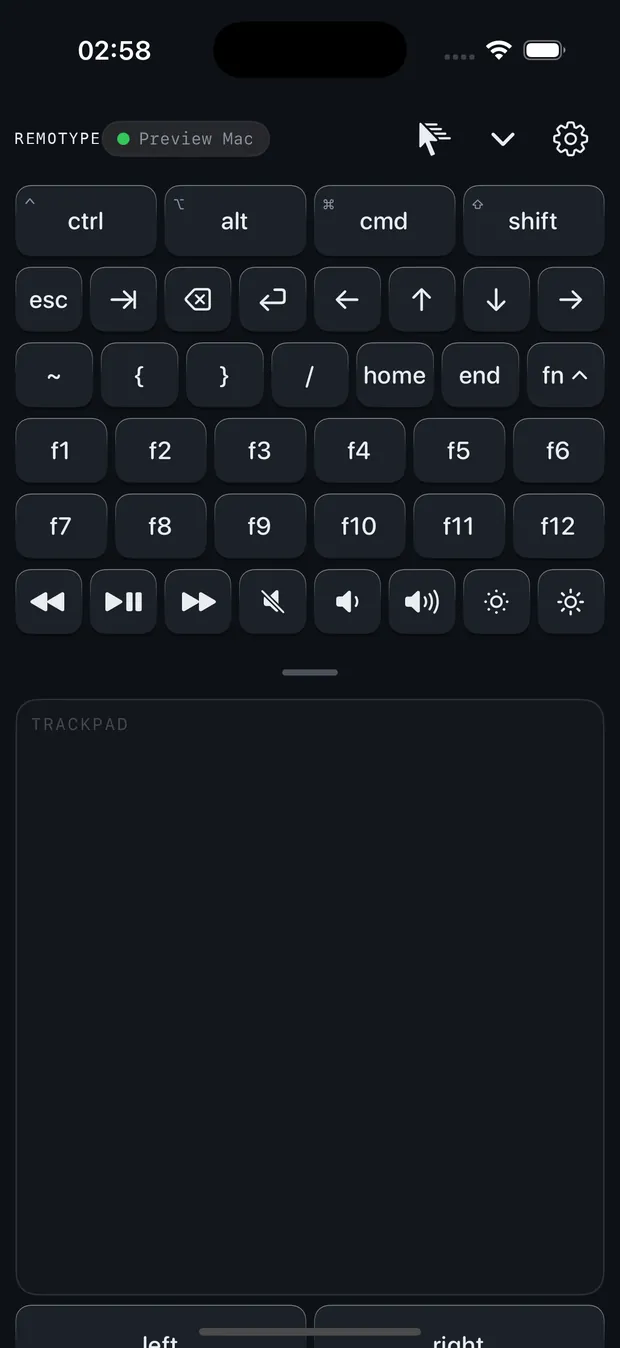
Esc, Tab, arrows, Home/End and F1–F12 in a collapsible drawer are free. Media, volume and brightness keys are Premium — and the brightness keys are honoured by the Windows host.
iPhone & AndroidF-keys freeMedia & brightness: PremiumBrightness: Windows host
Screen mirror
See your computer's screen on your phone, following your cursor — or, with a Mac host, the text caret itself in native apps. Go fullscreen and steer without looking up.
Send your computer's screen to a Chromecast or Google TV, driven from the phone. Full on a Mac host, with quality and volume control; partial on Windows, which also offers Miracast.
iPhone & Android · Requires HostMac full / Windows partial · not LinuxPremium
Android TV remote, over Wi-Fi
D-pad, OK, number pad, back, home, power, volume and real text entry for an Android or Google TV. The phone reaches the TV directly after a six-digit code shown on screen — no Host, nothing on the TV.
A dumb TV, or an iPad, that accepts a Bluetooth keyboard: pair the Android phone through its accessory settings. Plain keyboard and trackpad stay free; the D-pad and media remote are Premium.
Android · BluetoothNothing on the TVKeyboard freeD-pad: Premium
Present like you mean it
Slide a finger on the phone to move a laser dot, a spotlight that dims the room, freehand ink, shapes, a blank screen and a countdown. Remotype Host draws them on the computer's own screen, so they appear in screen shares and recordings — when you share the whole screen, not a single window or a browser tab. Slide keys and the on-phone timer also work over Bluetooth on Android.
iPhone & Android · Requires HostMac & Windows · not LinuxPremium
A studio in your pocket
Dictate to the desktop, type stored passwords behind Face ID or a fingerprint, fire macros, tap out a numpad, point with a gyro air-mouse. All of it travels over Bluetooth on Android, or over the Host on either phone.
Android · Bluetooth or HostiPhone · needs HostPremium
Clipboard and computer vitals
Pull the computer's clipboard down to the phone, push text or a file back up, carry it with you when you switch computers, and glance at CPU, memory, volume and now-playing.
iPhone & Android · Requires HostMac & Windows · not LinuxPremium
A macro deck for the app you live in
Build combos, snippets and key sequences into one-tap tiles, use the ready-made Excel set, or import and export your own. Key-sequence macros travel over Bluetooth too.
Android · Bluetooth or HostiPhone · needs HostPremium
Away from home
Connect by IP over your own Tailscale or VPN link — the Host listens on a fixed port, and the traffic runs over your tunnel, not through us. Switch between several computers without disconnecting.
iPhone & Android · Requires HostMac · Windows · LinuxPremium
Works where nothing else does
TV-connected PCs, presentation rigs, work machines that forbid installs — the computer sees an ordinary Bluetooth keyboard and mouse, so there is nothing to install on it. On iPhone, Remotype Host has to be installed on the computer instead.
Android · BluetoothFree
A connection that survives
On Android a quiet foreground service keeps the link alive through screen-off and app-switching. Both apps reconnect to your last computer on their own.
iPhone & AndroidForeground service: AndroidFree
Made to be looked past
The MILLED interface: machined keycaps that press with real travel and instant feedback — designed for eyes-on-the-other-screen use.
Accessible, properly
Large text, screen readers, reduced motion — supported on both platforms, to the same standard as everything else we ship.
No analytics. No account. No ads.
Keystrokes go from your phone to your computer and nowhere else. One exception: starting the trial stores a salted device hash and a date. That is the only moment the app needs the internet for itself.
A quick look
Machined for the hand. Built for the room.
The deck
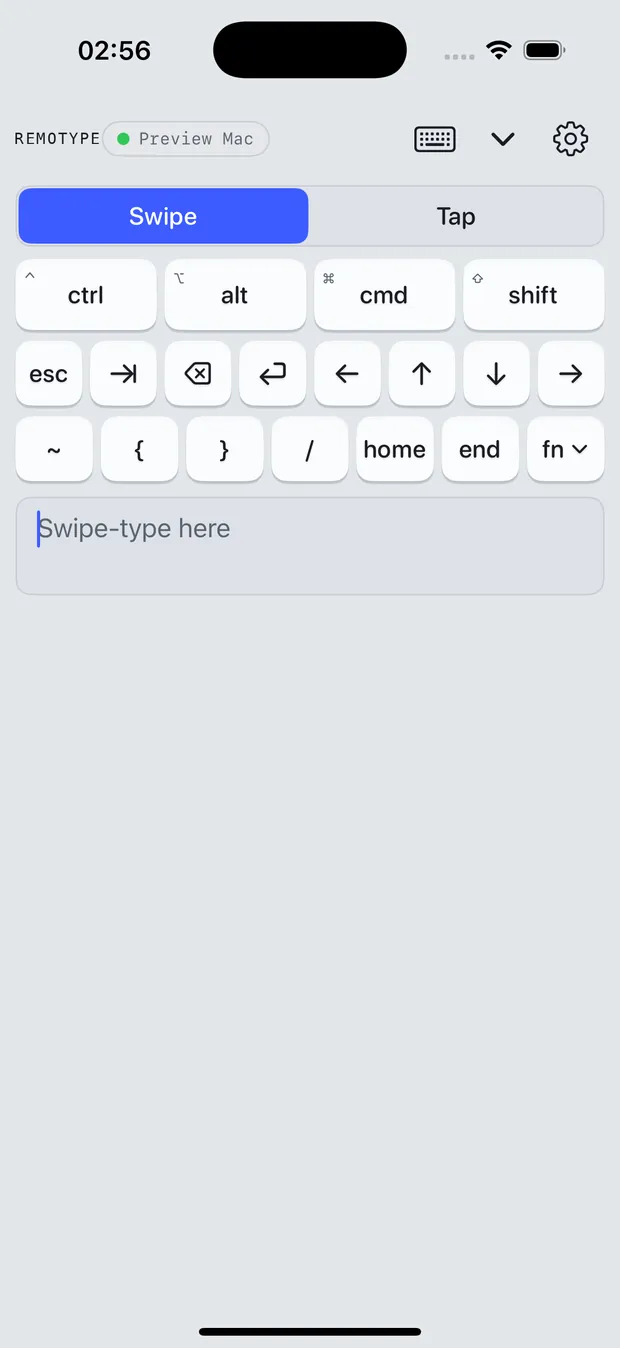
Modifiers up top, navigation underneath, your own swipe keyboard at the bottom. Keys press down with real travel and spring back — you can feel where you are without looking.
Hold or quick-tap modifiers for chords
Esc, Tab, arrows, Home/End in reach
Swipe-type with autocorrect, one thumb
The trackpad
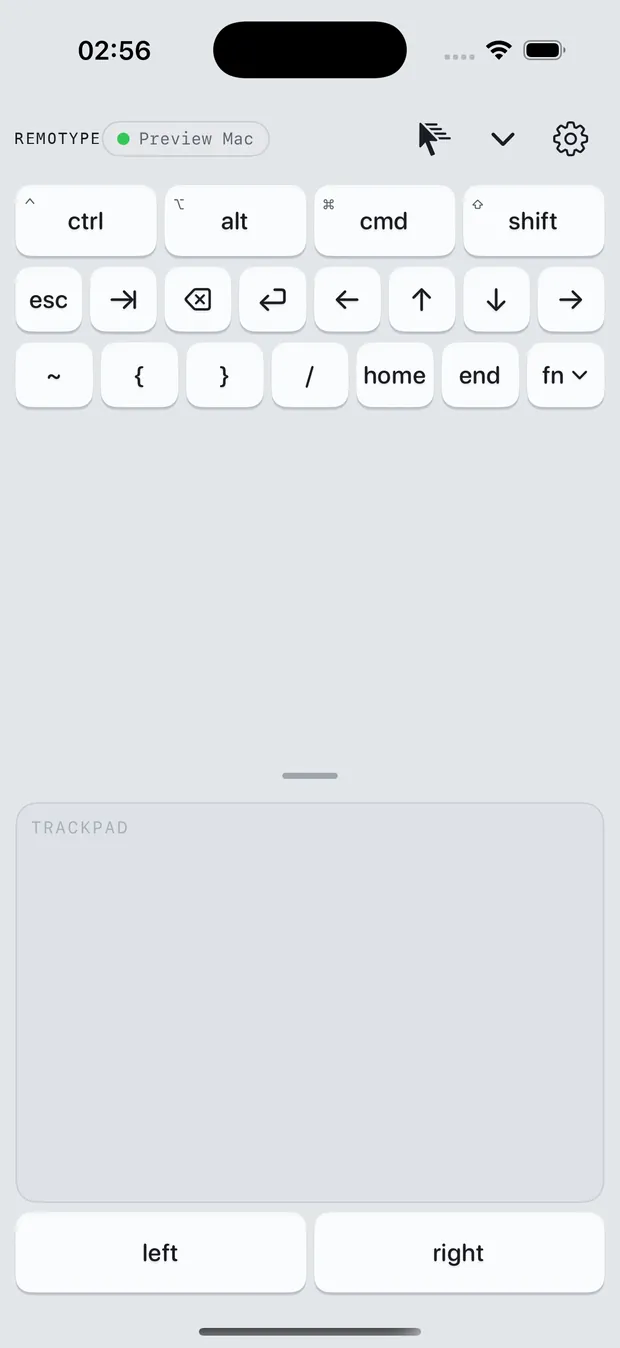
A pad the size of your screen. Tap to click, two fingers to scroll or right-click, pinch to zoom, hold a button to drag — with pointer speed tuned the way you like it.
Resizable, full multi-touch
Natural or traditional scrolling
Both mode: keyboard + trackpad on one screen, free on Android and iPhone
Dark, with everything in reach
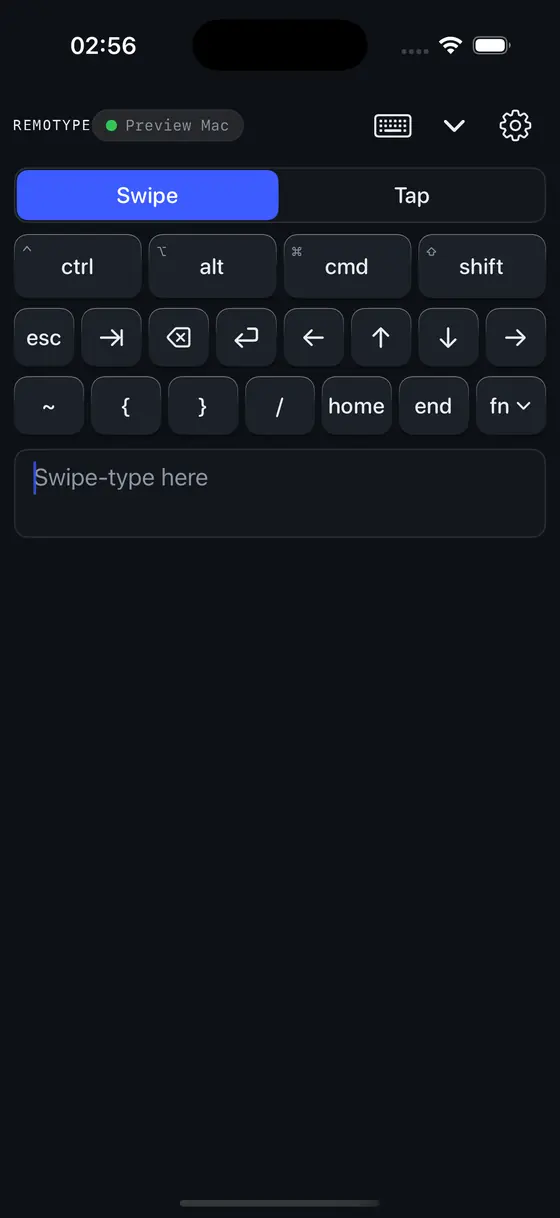
A true dark deck for movie-night control, and an Fn drawer that slides out when you need F-keys, volume, brightness or playback — and disappears when you don't.
Full dark mode, machined edge to edge
F1–F12 free; media, volume and brightness keys are Premium
Haptics you can switch off
Pricing
Keyboard and trackpad are free forever.
Everything else is Premium: $4.99 a month, $39.99 a year, or $99.99 once. Free for 14 days, once per device — reinstalling does not restart it — then 30 minutes a month. No ads, no account, no tracking — on any tier.
Free forever
No trial clock, no timer, nothing to sign up for.
$0 forever
Keyboard
Swipe and tap typing, modifiers, the Fn row. Non-US layouts and accented text included — over the Host; over Bluetooth the computer applies its own layout.
Trackpad
Multi-touch move, click, scroll and pinch to zoom.
Both mode
Keyboard and trackpad on one screen.
Finding and connecting to a computer on your network
Your computer appears on the phone, you pair with a code shown on its screen, and every session is sealed with AES-256-GCM. On Android you can instead pair over Bluetooth, with nothing installed on the computer. iPhone connects over Wi-Fi to the free Remotype Host — Apple does not let a phone act as a Bluetooth keyboard.
No ads, no account, no tracking. The Remotype Host for Mac, Windows and Linux is free on every tier and open source under Apache-2.0. In the app, Keyboard, Trackpad and Both never show a lock.
Premium
Every other mode, on both phone apps. Three ways to pay.
$4.99/ month
$39.99/ year
$99.99once — Eternal License
Next major version: 30% off — a standing commitment
14 days of everything on every new install.Then 30 minutes of Premium a month, free. No card, no account — and the 14 days are counted per device, so reinstalling does not restart them.
Numpad, media keys, presentation remote, air mouse, macros, dictation, Secrets
On-device dictation typed as keystrokes; passwords released by Face ID or a fingerprint and typed straight to the computer, never through the clipboard. On Android these also travel over Bluetooth. Screen-brightness keys need a Windows host.
Screen mirror, Spotlight presenter, clipboard sync and file transfer, computer vitals, edge flow between computers
The Spotlight overlay is drawn by the computer, so it shows in whole-screen shares and recordings — not in a single-window or tab share. Mac and Windows hosts; not Linux.
Computer audio streamed to the phone
Mac host only. Not Windows, not Linux.
Cast the computer screen to a TV or Chromecast
Full on a Mac host, with quality and volume control. Partial on Windows. Not on Linux.
TV and iPad remotes
Android TV and Google TV over Wi-Fi, from iPhone or Android, with a code on the TV and no host involved. Any other TV, or an iPad, that accepts a Bluetooth keyboard: Android only.
Multi-computer switch, and Connect-by-IP over Tailscale or a VPN
Reach a computer on another network. Android switches across Bluetooth and Wi-Fi computers; iPhone across Wi-Fi hosts.
Locked modes stay visible in the app with a lock glyph, and tapping one opens the paywall. After the trial, the 30 minutes count only while a Premium feature is in use on a live connection — free modes and idle time never count, and one-shot actions such as a secret type-out or a computer switch cost a flat 5 seconds. Refilled on the 1st.
What the Eternal License actually means
$99.99 once. Read it as a one-time purchase of this version that does not expire.
It unlocks the current major version for good. Remotype 1 and every 1.x update are included, with no renewal and no expiry.
The version you buy keeps working. Compatibility fixes for new macOS, Windows, Linux, iOS and Android releases are free for as long as Custavia exists.
Only new features go into a next major version. Nothing is moved out of the version you own to sell it back to you.
A next major version is 30% off for you. Eternal License holders pay 70% of the then-current price. You are never forced to upgrade, and Remotype 1 is never switched off.
It was sold as Lifetime before; same product, same store item. Full wording in the Terms of Use — changes to the terms never take away a license you already paid for.
Prices are USD; stores show local equivalents. Purchases happen inside the app, through the App Store or Google Play — Custavia never sees your payment details. Restore Purchases covers your other devices on the same store account; an App Store purchase does not unlock the Google Play version, or the reverse.
Monthly and annual plans renew until you cancel in the store's subscription settings; cancelling keeps access to the end of the paid period, and refunds are handled by the store. Starting the trial is the only moment the app needs the internet: it stores a salted hash of a device identifier and the start date, and nothing else.
A keyboard app sees every keystroke. Six things you can check for yourself, then the questions people ask before they buy.
A pairing code on the computer
The first time a phone connects over Wi-Fi, Remotype Host shows a code on the computer's screen and the phone has to enter it. Being on the same Wi-Fi is not enough. On Android over Bluetooth, the operating system's own pairing screen does the same job.
Sessions sealed with AES-256-GCM
After pairing, every message between phone and computer is encrypted with AES-256-GCM, and the encryption code is identical in the macOS, Windows and Linux hosts. There is no cloud relay in the path.
The host makes zero internet connections
No updater, no telemetry, no account — on any of the three hosts. It sits in the Mac menu bar or the Windows and Linux tray, can start at login, and you fetch a new version yourself when you want one. Put it behind an outbound firewall and watch nothing leave.
The host source is public
All three hosts, for macOS, Windows and Linux, are open source under Apache-2.0 at github.com/Custavia/remotype-host. Read what happens to a keystroke before you run it. The macOS host is signed and notarized by Apple; the Windows and Linux builds are unsigned, so Windows SmartScreen warns on install.
No account, no ads, no analytics
The phone apps have no sign-up, no ads and no analytics. Activating the 14-day trial is the one moment the app needs the internet for itself, and that server keeps only a salted hash of a device identifier and the start date; buying or restoring Premium goes through the App Store or Google Play, and Custavia never sees payment details. Read the privacy policy, or what Remotype does not collect.
Every dropped connection, in public
Dropped connections are the complaint we hear most about apps in this category — including ours. We keep a public log of each one we have found and fixed — and of what still goes wrong. Read the reliability log.
Questions people ask before they buy
Keyboard and trackpad free forever · Premium $4.99 a month, $39.99 a year, or $99.99 once · Android adds Bluetooth with nothing installed; iPhone is Wi-Fi with the free host.
How much does Remotype cost?Keyboard and trackpad free forever. Premium $4.99 a month, $39.99 a year, or $99.99 once.
Keyboard, trackpad, Both mode, and finding and connecting to a computer on your network are free forever, with no ads, no account and no tracking. Everything else is Premium: free for 14 days on every new install (the trial is per device, and a reinstall does not restart it), then 30 minutes a month, which only counts down while a Premium feature is actually in use. Prices are USD; stores show local equivalents.
Is it a subscription?Only if you pick monthly or annual. The $99.99 one-time purchase is not.
Monthly ($4.99) and annual ($39.99) plans renew until you cancel in the store's subscription settings; access then runs to the end of the paid period, and the store handles refunds. The Eternal License is $99.99 once, with no recurring charge. Keyboard and trackpad never need a payment of any kind.
What does Eternal License mean — is it lifetime?Remotype 1 is yours for good, and compatibility fixes stay free.
The Eternal License (previously sold as Lifetime — same store item) is $99.99 once and unlocks the current major version, Remotype 1, for good: every 1.x update is included, with no renewal and no expiry. Compatibility fixes for new macOS, Windows, Linux, iOS and Android releases are free for as long as Custavia exists; only new features go into the next major version. A license is tied to the store account that bought it, so it covers that account's Android and iPhone apps but does not carry from the App Store to Google Play, or back.
Do I get the next version?Every 1.x update, yes. The next major version is 30% off.
Every 1.x update is already included. When a next major version ships, Eternal License holders pay 70% of the then-current price — a 30% discount. You are never forced to upgrade: the version you licensed keeps working and will not be switched off.
Does it work on iPhone?Yes, over Wi-Fi with the free host. There is no Bluetooth keyboard mode on iPhone.
It is an iPhone app; an iPad can install it and run it in iPhone compatibility mode. It connects over Wi-Fi, with the free Remotype Host on the Mac, Windows or Linux computer. An iPhone cannot act as a Bluetooth keyboard because Apple does not allow it, so the path that installs nothing on the computer is Android only. The one iPhone feature that needs no host is the Android TV remote, which talks to the TV directly.
Do I have to install anything on my computer?Android over Bluetooth: nothing at all. iPhone, or anything on screen: the free host.
On Android over Bluetooth, no — the computer sees an ordinary Bluetooth keyboard and mouse. On iPhone, and for anything that needs data back from the computer (screen mirror, clipboard, the Spotlight overlay, casting, computer vitals), you run the free Remotype Host: Mac or Windows for those features, Linux for input. It is a menu-bar or tray app with no account and no updater. Setup instructions are at remotype.custavia.com/product-help.
What if my work PC has Bluetooth turned off?Then the Bluetooth path is not available, and the Wi-Fi path needs the Host installed.
The no-install path is a real Bluetooth keyboard, so the PC needs a Bluetooth radio with Bluetooth switched on. Managed corporate builds often disable it by policy, or ship without a radio at all. If that is your machine, the only other route is Wi-Fi to the free Remotype Host — which is an install, and that is the thing your policy may not allow. Worth checking before you buy.
How do I pair a computer with no monitor?Attach a display, or use a remote session, for the first connection only.
Pairing shows a code on the computer’s own screen and the phone has to enter it, on Mac, Windows and Linux alike — being on the same Wi-Fi is never enough. A headless mini-PC, NUC or home server therefore needs a display, or a remote-desktop session, for that one connection. After it is paired the phone reconnects on its own, and every session is sealed with AES-256-GCM.
Does it work on Linux?Yes, for input — keyboard, trackpad, media keys, on X11 and Wayland.
The Linux host does keyboard, trackpad, media keys, non-US layouts with dead keys, and the full trust layer — pairing code and AES-256-GCM sessions — on both X11 and Wayland, because it injects input through uinput. Screen mirror, the Spotlight overlay, clipboard sync and casting are out of scope on Linux by design, and computer audio needs a Mac host. The Linux build is unsigned, and open source like the others.
Does the spotlight show up in Zoom or recordings?Yes — the host draws it on the computer's own screen.
Remotype Host draws the spotlight, laser, ink, shapes and blank screen on the computer's own screen, not on the phone, so they appear in screen shares and in recordings when you share the whole screen rather than a single window or a browser tab. The same goes for the countdown timer overlay. Spotlight is Premium and works with Mac and Windows hosts, not Linux.
Is it better than a Logitech Spotlight?Different tool: a phone app, with an overlay that survives screen sharing.
It is a different kind of tool. A hardware clicker needs no software on the computer, and Remotype matches that only on Android over Bluetooth, where slide keys and the on-phone timer work with nothing installed. What a clicker cannot do: draw a spotlight, ink, shapes, a blank screen and a countdown onto the computer's own screen so a remote audience sees them (Mac and Windows hosts), and be a full keyboard and trackpad for the rest of the day.
How is this different from Universal Control, Sidecar, Phone Link or remote desktop?Those all solve a different problem, and each one stops at the edge of its own ecosystem.
Universal Control shares the keyboard and mouse you are already sitting at with a second Mac or an iPad, on the same Apple Account; it does nothing for a Windows PC and cannot turn a phone into the keyboard. Sidecar makes an iPad a second display for a Mac — pixels travel out, typing does not travel back. iPhone Mirroring and Windows Phone Link run your phone on the computer's screen, driven by the computer's own keyboard, which is the opposite direction. Remote desktop apps stream the computer to the phone but still need you to type on a phone-shaped screen. Remotype does the plain thing none of them do: the phone in your hand becomes the keyboard, trackpad and remote for a computer or TV a few feet away, across macOS, Windows, Linux, Android and iOS.
Can I use it as a TV remote?Yes. Android TV over Wi-Fi from either phone; any Bluetooth TV from Android.
Two ways, both Premium. For Android TV and Google TV, the phone talks to the TV directly over Wi-Fi after a 6-digit code shown on the TV — D-pad, OK, number pad, back, home, power, volume and text entry — from iPhone or Android, with no Remotype Host involved. For any other TV, or an iPad, that accepts a Bluetooth keyboard, an Android phone pairs over Bluetooth with nothing installed on the device.
Is it open source?The hosts are, under Apache-2.0, on all three platforms.
Remotype Host for macOS, Windows and Linux is open source under Apache-2.0 at github.com/Custavia/remotype-host, so you can read exactly what runs on your computer. The phone apps are not open source; they come from the App Store and Google Play.
Does it send my keystrokes anywhere?No. Phone to computer, no cloud relay, and the host never goes online.
Keystrokes and pointer moves go from your phone to your computer over your own network, or over Bluetooth on Android, and nowhere else: there is no cloud relay, no analytics and no account, and the host makes zero internet connections. If the computer is on another network, Connect-by-IP (a Premium feature) carries the same traffic over your own Tailscale or VPN link. The one time the app itself needs the internet is the trial activation, which stores a salted hash of a device identifier and the start date.
It types your passwords. So it keeps nothing about you.
A keyboard app sees everything you type — which is exactly why Remotype sends keystrokes from your phone to your computer and nowhere else. No analytics, no telemetry, no accounts, no cloud, no ads. One exception: starting the trial stores a salted device hash and a date. The whole policy fits on one page, in plain language.
This website counts visits and clicks with analytics we host ourselves: no cookies, nothing that identifies you.
iPhone: iOS 16 or later. Android: Android 9 or later.
Remotype Host · the free companion
Required on iPhone. On Android it is optional for typing over Bluetooth, and it is what unlocks screen mirror, computer audio (Mac host only), clipboard pull and file transfer, computer vitals, the presenter overlay, casting, edge flow between computers and Connect-by-IP. The Linux host is input only — keyboard, trackpad and media keys. Free, open source, no account, no telemetry. Full details and the host matrix.
macOS 1.1.1 · Windows 1.1.1 · Linux 1.1.1 · macOS 13+, Intel & Apple silicon (signed & notarized) · Windows 10+, x64 & ARM64 · Linux: Ubuntu/Debian .deb for x64 (ARM64), or a tarball for any distro (x64, ARM64) · Checksums · Source on GitHub.