
One phone for all your computers
Switch between computers in a tap — and on Mac and Windows, slide the pointer off one screen and onto the next.
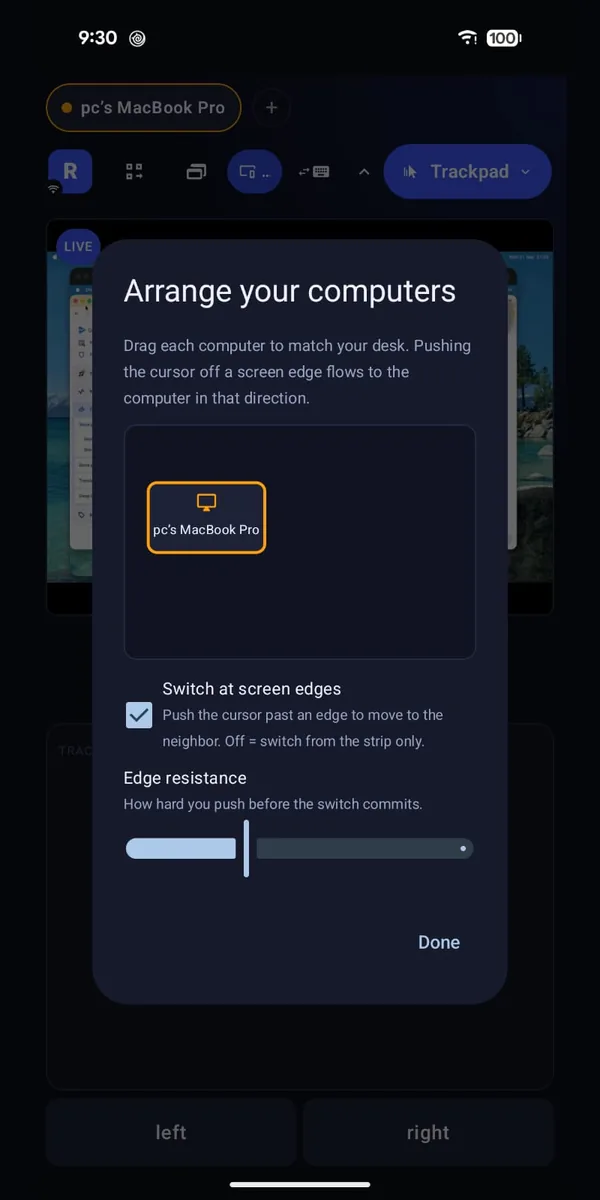
A work laptop, a home desktop and a computer under the TV don’t need three keyboards. They need one phone that knows where each of them is.
What you can do
Switch in a tap
Stay connected to several computers and jump between them.
Arrange them like your desk
Tell Remotype which computer is on the left and which is on the right.
Slide between screens
Push the pointer off the edge of one screen and it appears on the next computer.
Your clipboard comes along
Copy on one computer, paste on the next.
Even when you’re away
Reach a computer on another network through your own Tailscale or VPN — nothing goes through us.
How to start
- Install Remotype Host on each computer and connect to each one once.
- Switch from the list, or arrange them to match your desk.
Worth knowing
- Part of Premium. Sliding between screens and carrying your clipboard need Remotype Host on Mac or Windows.
Good for
- Work laptop on the left, home computer on the right, one pointer between them.
- A TV computer, a home server and a desktop, each a tap away.
- Checking on the home computer from a café, over your own Tailscale.
Goes well with
Try it
Keyboard and trackpad are free forever. Everything else is free for 14 days, then 30 minutes a month — or $4.99 a month, $39.99 a year, or $99.99 once.