A TV remote with a number pad and a real keyboard
Control an Android TV or Google TV straight from your phone — arrows, number pad, power, volume, and your phone’s keyboard for searching. No computer needed.
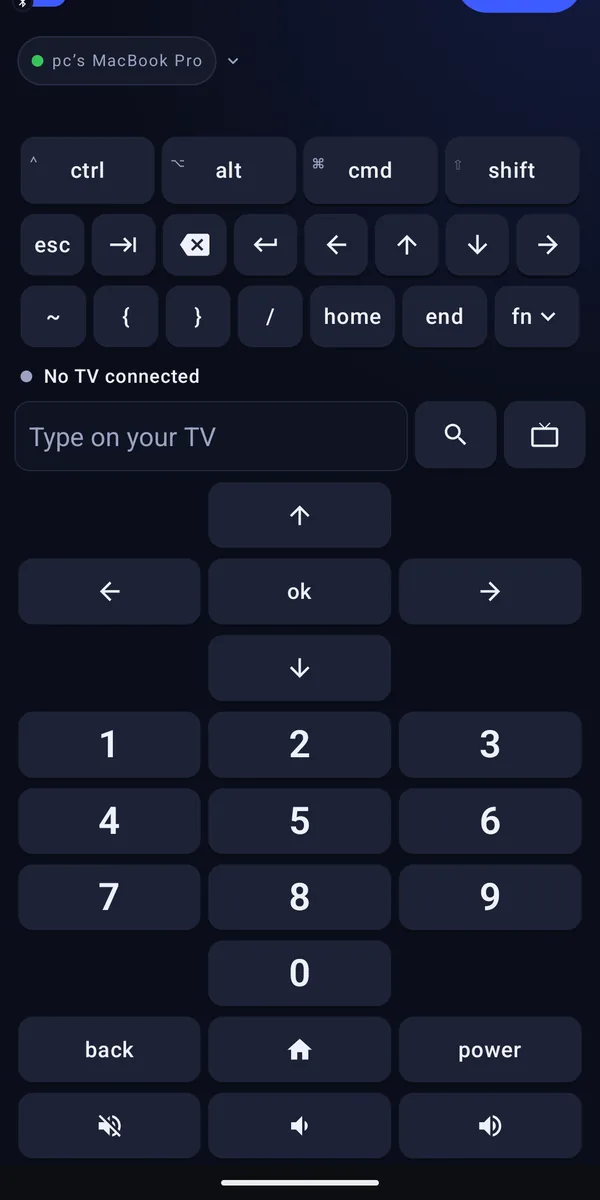
Typing a film title one letter at a time with arrow keys is nobody’s idea of fun. Remotype talks to your TV directly, so you get a number pad for channels, arrows for everything else, and your own phone keyboard whenever there’s something to type.
What you can do
Arrows and OK
Big enough to use without looking.
A number pad
Jump straight to a channel — the thing most phone remotes forget.
Type with your phone
Searches, sign-ins and Wi-Fi passwords, typed properly.
Power, home, back and volume
Everything you reach for most. Power double-checks with you first, so you don’t switch the TV off by accident.
Pair once
Type the code your TV shows, and your phone remembers it after that.
How to start
- Put your phone and your TV on the same Wi-Fi.
- Open the TV remote and choose your TV.
- Type the code the TV shows. That’s it — next time it just connects.
Worth knowing
- Works with Android TV and Google TV, from both iPhone and Android. No computer and no Remotype Host needed.
- Other TVs, games consoles and iPads: an Android phone can also connect as a Bluetooth keyboard and mouse. iPhones can’t do this — Apple doesn’t allow it.
- One phone controls the TV at a time. Disconnect to hand it over.
Good for
- The remote is somewhere in the sofa. Your phone is in your hand.
- Channel 247 in three taps, not forty-nine presses of the up arrow.
- Typing a Wi-Fi password into a TV with a real keyboard.
- Searching for that film whose name you only half remember — autocorrect included.
Questions
Can I use Remotype as a TV remote?
Yes. On both iPhone and Android, Remotype works as a remote for Android TV and Google TV over Wi-Fi, with no computer needed. On Android it can also connect to other TVs and consoles as a Bluetooth keyboard and mouse.
Goes well with
Try it
Keyboard and trackpad are free forever. Everything else is free for 14 days, then 30 minutes a month — or $4.99 a month, $39.99 a year, or $99.99 once.